
VAT Calculator — add or remove VAT
Work out the net price, VAT amount and gross price in one step. Add VAT to a price or take it off a VAT-inclusive total, with the standard and reduced rates for more than 55 countries already filled in.
Recent calculations
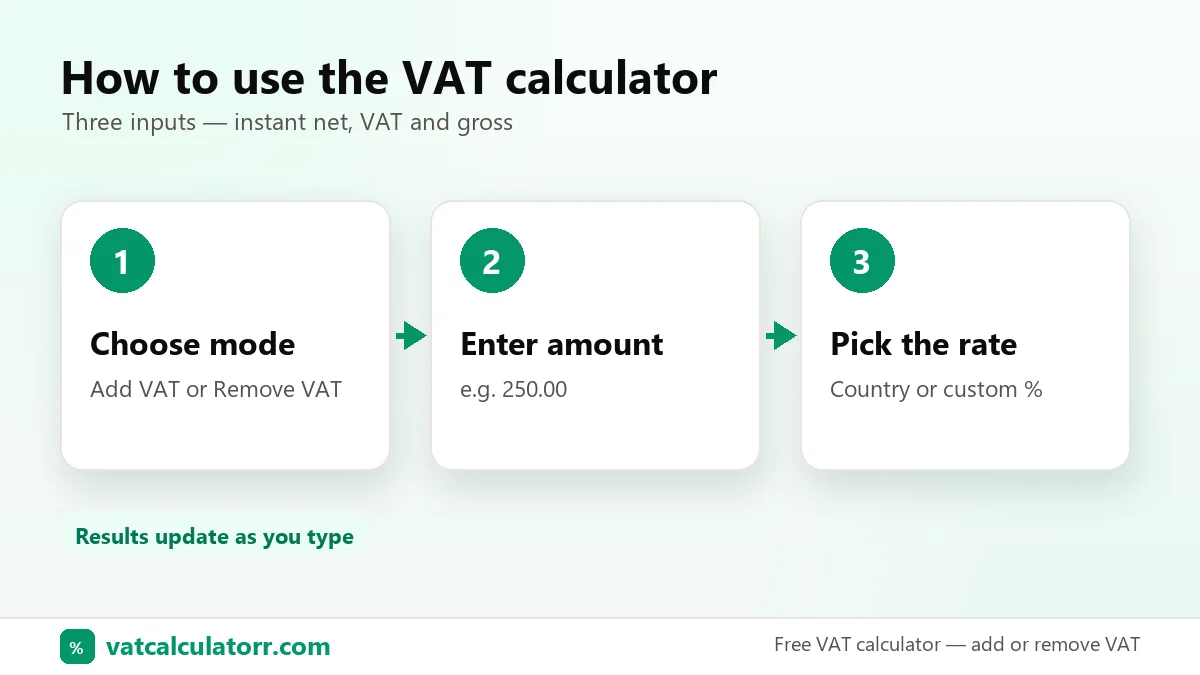
How to use the VAT calculator
Three inputs, instant results. Nothing to install and no sign-up.
Choose add or remove
Pick Add VAT if your price doesn’t include tax yet. Pick Remove VAT if you have a VAT-inclusive total and need the net price.
Enter the amount
Type the price. Commas and decimals both work, so 1,250.50 and 1250,50 give the same result.
Select the rate
Choose a country to load its standard rate, tap a reduced rate, or type any custom percentage. Results update as you type.
How to calculate VAT
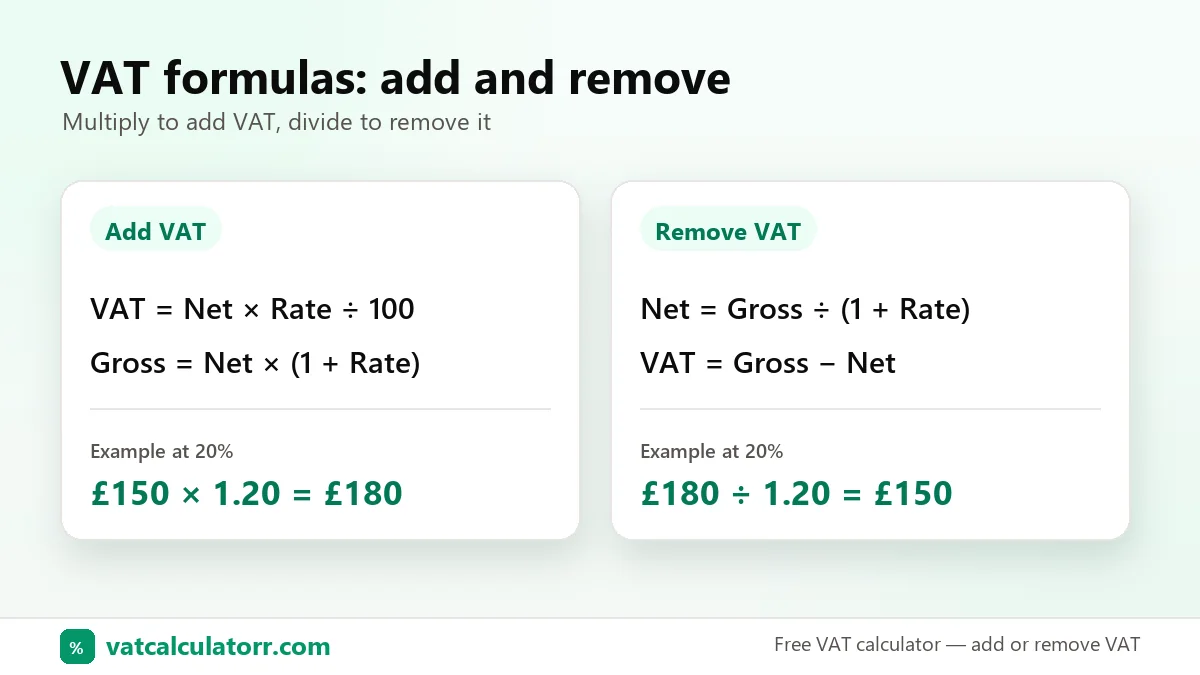
VAT is a percentage of the net price. You only need two formulas: one to add VAT and one to remove it.
Net price → gross price
VAT = net × rate ÷ 100
Gross = net × (1 + rate ÷ 100)
Example at 20%: £150 × 1.20 = £180, of which £30 is VAT.
Gross price → net price
Net = gross ÷ (1 + rate ÷ 100)
VAT = gross − net
Example at 20%: £180 ÷ 1.20 = £150, so the VAT was £30.
The common mistake: taking 20% off a VAT-inclusive price. £180 − 20% is £144, not £150. VAT was added to the net price, so you divide by 1.20 instead of subtracting 20%. At 20% the VAT is always one sixth of the gross total.
VAT calculation examples
Add 20% VAT to £250 (UK)
Gross £300.00 · VAT £50.00- VAT = 250 × 20 ÷ 100 = 50
- Gross = 250 + 50 = 300
Remove 5% VAT from AED 1,050 (UAE)
Net AED 1,000.00 · VAT AED 50.00- Net = 1,050 ÷ 1.05 = 1,000
- VAT = 1,050 − 1,000 = 50
Remove 15% VAT from R 2,300 (South Africa)
Net R 2,000.00 · VAT R 300.00- Net = 2,300 ÷ 1.15 = 2,000
- VAT = 2,300 − 2,000 = 300
Add 23% VAT to €80 (Ireland)
Gross €98.40 · VAT €18.40- VAT = 80 × 23 ÷ 100 = 18.40
- Gross = 80 + 18.40 = 98.40
The right VAT rate, already filled in.
Select a country and its standard rate loads automatically, with its reduced rates one tap away. That covers the UK, every EU country, the Gulf states, South Africa and GST countries like Australia and New Zealand.
- Standard and reduced rates per country
- Local currency symbol on every result
- Custom rate for anything else
Take VAT off any receipt.
Switch to Remove VAT, paste the total from an invoice or till receipt, and you get the net price and the exact VAT you paid. That’s the figure you need for expense claims and VAT returns.
- Correct reverse formula, not a flat percentage
- Copy any figure with one click
- Save calculations to your history
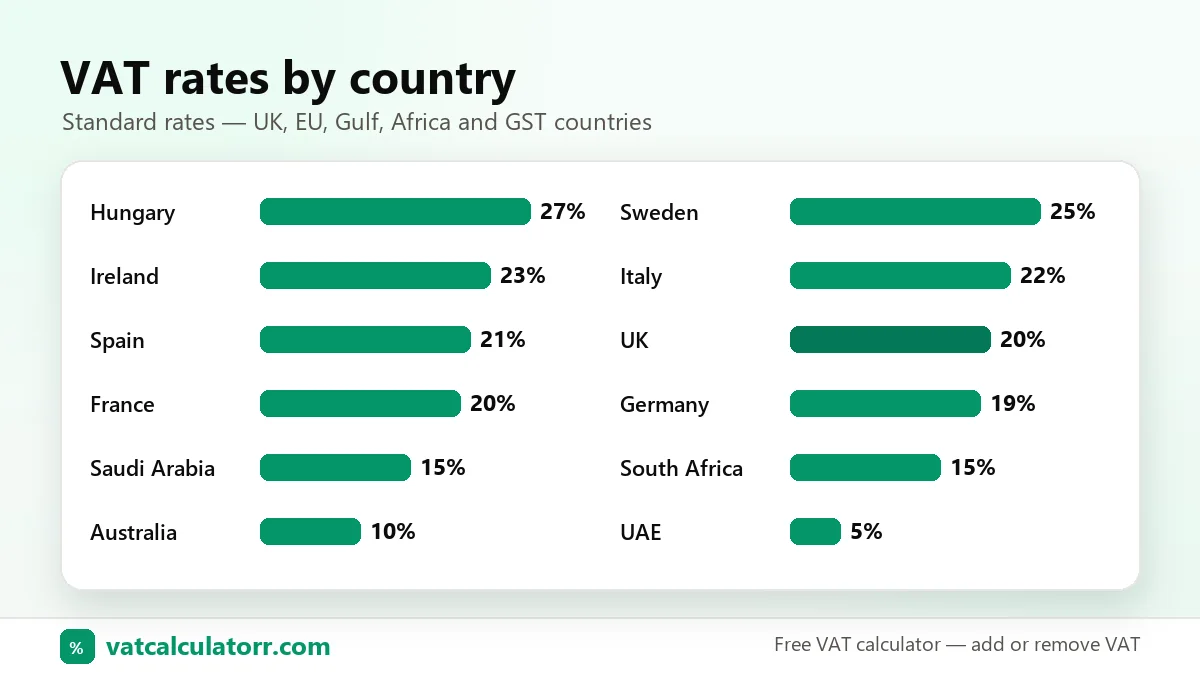
VAT rates by country
Standard rates for the most-searched countries. The calculator includes reduced rates and many more countries.
| Country | Standard rate | Reduced rates |
|---|---|---|
| United Kingdom | 20% | 5%, 0% |
| Ireland | 23% | 13.5%, 9%, 4.8%, 0% |
| Germany | 19% | 7% |
| France | 20% | 10%, 5.5%, 2.1% |
| Spain | 21% | 10%, 4% |
| Italy | 22% | 10%, 5%, 4% |
| Netherlands | 21% | 9% |
| United Arab Emirates | 5% | 0% |
| Saudi Arabia | 15% | 0% |
| South Africa | 15% | 0% |
| Australia (GST) | 10% | 0% |
| New Zealand (GST) | 15% | 0% |
See all rates on the VAT rates by country page. Rates change from time to time, so always check with your local tax authority before you file. Official sources: HMRC VAT rates and the EU TEDB database.
VAT calculators by country
Each one opens with the right rate and currency already set.
UK VAT Calculator
20% standard, 5% reduced and 0% zero rate.
Open →Reverse VAT Calculator
Take VAT off a gross price to find the net amount.
Open →UAE VAT Calculator
Add or remove 5% VAT in AED.
Open →Saudi VAT Calculator
15% VAT in SAR for KSA invoices.
Open →South Africa VAT
15% VAT in rand, inclusive or exclusive.
Open →Ireland VAT Calculator
23%, 13.5%, 9% and 4.8% rates.
Open →Germany VAT (MwSt)
19% and 7% Mehrwertsteuer.
Open →EU VAT Calculator
Rates for every EU member state.
Open →VAT vs sales tax vs GST
All three are consumption taxes paid by the end customer. They differ in how they are collected.
| VAT | Sales tax | GST | |
|---|---|---|---|
| Charged at | Every stage of supply | Final sale only | Every stage of supply |
| Businesses reclaim input tax? | Yes | No | Yes |
| Usually shown | Included in shelf price | Added at checkout | Included in shelf price |
| Used in | UK, EU, UAE, Saudi Arabia, South Africa | United States | Australia, New Zealand, Singapore, Canada |
GST works the same way as VAT, so you can use this calculator for GST too. Read more in VAT vs sales tax and VAT vs GST, or see the European Commission’s VAT overview.
Who uses a VAT calculator?
Freelancers
Add VAT to day rates and invoices, and check what a client will actually pay.
Small businesses
Price products, check supplier invoices and prepare figures for VAT returns.
Shoppers & travellers
See how much tax is inside a price, or estimate a VAT refund when shopping abroad.
Bookkeepers
Split gross receipts into net and VAT quickly, with the formula shown for checking.
VAT calculator FAQs
How do I calculate VAT?
Multiply the net price by the VAT rate and divide by 100. For example, 20% VAT on £100 is £100 × 20 ÷ 100 = £20, so the gross price is £120.
How do I remove VAT from a price?
Divide the gross price by 1 plus the rate as a decimal. At 20%, divide by 1.20: £120 ÷ 1.20 = £100. The VAT is the difference, £20. Don’t subtract 20% from the total, because that gives the wrong answer.
What is the VAT rate in the UK?
The UK standard rate is 20%. A reduced rate of 5% applies to some goods and services, such as home energy, and a 0% zero rate applies to most food, children’s clothing and books.
How much is 20% VAT on £1,000?
20% VAT on £1,000 is £200, making a gross price of £1,200. If £1,000 already includes VAT, the net price is £833.33 and the VAT is £166.67.
What is the difference between VAT inclusive and VAT exclusive?
A VAT-exclusive (net) price doesn’t include VAT. A VAT-inclusive (gross) price already has VAT added. Consumer prices in the UK and EU are normally shown VAT-inclusive.
Can I use this calculator for GST?
Yes. GST is calculated the same way as VAT. Pick Australia (10%), New Zealand (15%) or Singapore (9%), or type any GST rate as a custom rate.
Are the VAT rates up to date?
The calculator uses each country’s published standard and reduced rates. Rates do change, so confirm the rate for your product with your local tax authority before you invoice or file a return.
Is my data saved?
No. All calculations run in your browser. If you use “Save to history”, your recent calculations are stored only on your device and are never sent to us.
Work out VAT in seconds
Add or remove VAT for any country. It’s free and private, and it works on any device.
Use the VAT calculator ↑